CREATIVE KIDS TOP  Programming Education [Report] Report on a Class on Assembling a Raspberry Pi Computer
Programming Education [Report] Report on a Class on Assembling a Raspberry Pi Computer 




 Programming Education [Report] Report on a Class on Assembling a Raspberry Pi Computer
 Reprinted from the PEG page, a programming education project promoted by CANVAS.
*********************************************
We received a report introducing a class from Mr. Niimura, a middle school technology teacher and PEG partner!
The report provides a detailed account of the class—including the students’ excitement—so please be sure to check it out!
Last school year, Mr. Niimura conducted lessons using Raspberry Pi at Kami-Itabashi Second Junior High School, and this school year he is continuing to implement various teaching practices at his new school.
We have also featured Mr. Niimura’s teaching practices from last school year here:
http://pegpeg.jp/news/2014/09/11/664
***
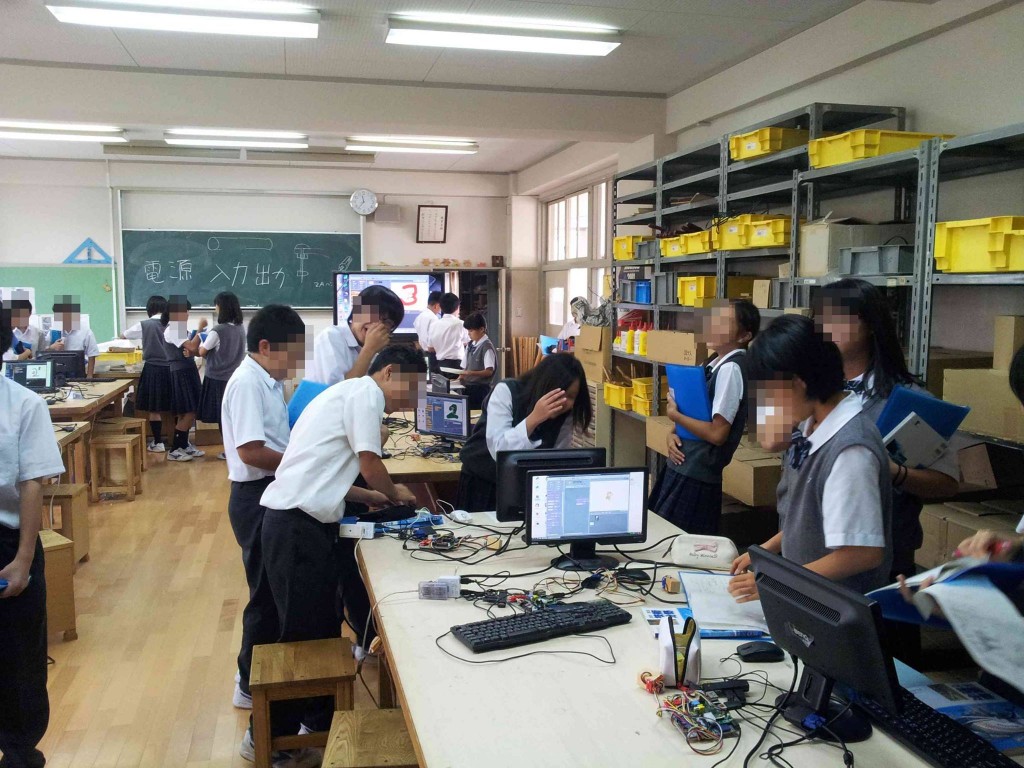
First-year students have started assembling Raspberry Pi computers in the technology lab. They’re charging ahead, eager to start making games as soon as possible. It’s like “Mission: Impossible”—they’re gathering monitors, cables, and other parts from cardboard boxes scattered
in the hallway to build their projects.
Here, we’re teaching a design philosophy that involves breaking down complex problems into simpler parts; specifically, we’re showing students how to categorize wiring into input, output, and power lines.
Although these first-year students are hooked on making games, they only actually play them for about five minutes. Why are they assembling Raspberry Pi computers in the tech lab instead of the computer lab?
The goal is to use the sawing assessment software.This is essentially a practice session for assembling the kit. Students work in pairs—one as the monitor operator and the other as the Raspberry Pi operator—to put the system together. Eager to finish
quickly and get tips on game development, the students who have finished early even go over to help the pairs that are falling behind. This marks the start of a class in the technology lab where computers are used as tools for making things.
Before this class, I had set the stage by having the students create the “Cat Escape” game in the computer lab, so when the class started, they asked, “Wait, why are we gathering in the tech lab if we’re going to be working on computers?” I introduced the Raspberry Pi and said, “We’re going to build a computer with this and make games!” And… when I used a pre-assembled Raspberry Pi as a demo to show them how to make a game using Scratch, I could really feel the students’ excitement building.
So, to make sure there are no mistakes, when things get tricky, I explain … and then we start building!
When the goal is clear and the steps are understood, students can overcome obstacles like figuring out the differences between power cords and other cables, or connecting them to the Raspberry Pi. “I want to make a game!
”—those are magic words for both boys and girls.
This computer-aided assembly project is integrated into the “3D Puzzle Making” course. In “3D Puzzle Making,
” students have already designed more challenging puzzles, completed the wood-cutting layout, and are now preparing to cut the pieces with a saw.
The goal is for students to become proficient in using the sawing evaluation software in the technology lab. This is part of the process of creating puzzles that are precise to the specified dimensions and free of waste.
With the goal of creating high-quality puzzles, we structure our lessons to have a narrative flow.
The assessment here focuses on the fact that the computer consists of input, output, and control devices (Raspberry Pi). Students are expected to know the names and functions of each device and be able to actually wire and assemble the system.
In the wiring class, after assembly, students visually inspected the wiring and traced over the lines on the worksheet with a thicker marker.


Professor, Keio University; Ph.D. (Policy and Media)
Director, B Lab
Chairperson, Learning of Tomorrow (General Incorporated Association)
Chairperson, CANVAS
After graduating from the Faculty of Engineering at the University of Tokyo, he served as a visiting researcher at the MIT Media Lab before founding the NPO CANVAS and the Learning of Tomorrow Association, a General Incorporated Association, and assuming the role of representative. He serves as an outside director for Matsuya Co., Ltd., Fuji Media Holdings, Inc., and Digital Garage, Inc.
He has served on various government committees, including the Information and Communications Council of the Ministry of Internal Affairs and Communications, as well as the NHK Central Broadcasting Program Council. He also serves as a director of the Digital Signage Consortium, among other roles. He holds a Ph.D. in Policy and Media.
His publications include *Turning On Children’s Creativity!*, *What Are Smart Kids Doing on Their Smartphones?*, *The Forefront of Online Education in Japan: Considering Learning in the Post-COVID Era*,“What Is Programming Education? 45 Questions Parents Want to Know,” and “Declaration on Digital Education.” He has also provided supervision for numerous works, including “Ah, I See! Programming Education for Parents and Children Through Manga.”



































4052047885.jpg )















1.jpg)